
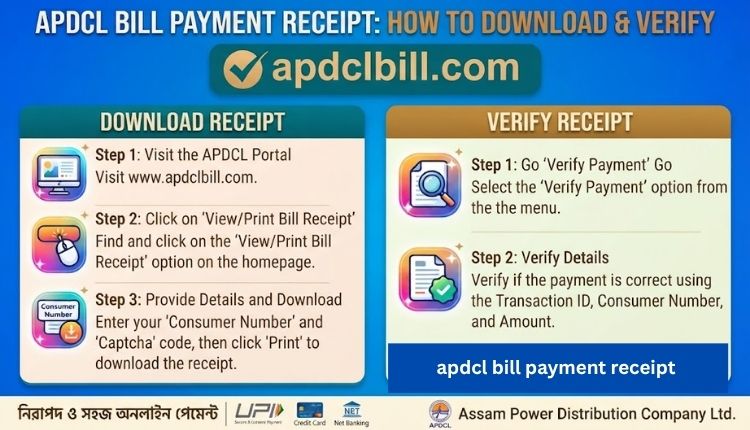
apdcl bill payment receipt
If you’ve just paid your electricity bill online, the job isn’t quite finished until you’ve got the receipt saved somewhere. An APDCL bill payment receipt is your proof that the money left your account and reached the utility, and it’s the first thing anyone will ask for if a payment goes missing or a landlord wants proof you’ve cleared your dues.
This guide covers where to find your receipt after paying, what should be printed on it, and what to do if it never showed up at all.
What Is an APDCL Bill Payment Receipt?
An APDCL bill payment receipt is the digital or printed confirmation generated after you successfully pay your electricity bill, whether that’s through the official bill payment page, the myBijulee app, a bank’s net banking portal, or a collection counter. It’s separate from your actual electricity bill. The bill tells you what you owe; the receipt proves you paid it.
Here’s what a typical receipt includes:
| Field | What It Shows |
| Consumer Account Number | Your 11-digit APDCL identification number |
| Transaction ID / Reference Number | Unique ID for that specific payment |
| Payment Date & Time | Exact timestamp of the transaction |
| Amount Paid | Total sum deducted from your account |
| Payment Mode | UPI, debit card, credit card, net banking, or wallet |
| Bill Period | The billing cycle the payment covers |
| Payment Status | Success, pending, or failed |
If any of these fields are missing or look wrong on your receipt, it’s worth double-checking against your bank statement before assuming it’s an error on APDCL’s end.
Why You Should Always Save Your Payment Receipt
A lot of people skip this step because the bill shows as “paid” on the portal a day or two later anyway. That’s true most of the time, but there are a few situations where having the receipt on hand saves you a genuine headache:
- Disputed payments: If your bill still shows as unpaid despite money leaving your account, the transaction ID on your receipt is what customer care will ask for first.
- Duplicate payments: Paid twice by accident? You’ll need the receipt to claim a refund or adjustment.
- Proof of address or tenancy: Landlords, banks, and government offices sometimes accept a utility payment receipt as supporting documentation.
- Tax or expense records: If you run a business connection, these receipts matter for your accounting.
How to Download Your APDCL Bill Payment Receipt Online
If you paid through the website and closed the tab before saving anything, don’t worry. You can usually still retrieve it.
- Head to the APDCL bill check page on this site.
- Enter your 11-digit consumer account number.
- Once your latest bill loads, look for the payment history or transaction section.
- Select the specific payment date, then choose the download or print option.
- Save the PDF to your device, or print it directly.
If your bill payment was made through a third-party app like a UPI service or a bank’s own portal, the receipt might actually be stored there instead of on APDCL’s system. Check your UPI app’s transaction history or your bank’s statement download section as a backup Visit more.
For a full walkthrough of checking your bill status before or after payment, the view APDCL bill page covers that in more depth.
Getting Your Receipt Through the myBijulee App
APDCL’s official app, myBijulee, keeps a running record of your payment history, which makes it one of the more reliable places to pull up an old receipt.
- Open the myBijulee app and log in with your registered mobile number.
- Go to the payment history or transaction log section.
- Tap on the relevant payment entry.
- Choose to view, download, or share the receipt.
This is worth doing if you pay bills regularly and want everything in one place instead of hunting through different apps every time you need a copy. The app also lets you check your bill through smart meter data if your connection is on that system.
Downloading a Receipt for a Prepaid Meter Recharge
If you’re on a prepaid connection, the receipt structure looks a bit different since you’re topping up a balance rather than clearing a monthly invoice. After a successful recharge or bill payment, you’ll get an SMS confirmation along with a digital receipt showing the recharge amount, transaction ID, and updated balance. This can also usually be pulled from the same payment history section mentioned above.
What If Money Was Deducted but No Receipt Was Generated?
This happens more often than it should, usually because of a slow connection or a payment gateway timeout right at the confirmation step. Here’s what to do:
- Wait 24 hours first: Most delayed confirmations resolve themselves within a day as the bank and APDCL’s systems sync up.
- Check your bank statement: Confirm the amount was actually deducted and note the reference number.
- Recheck your bill status: Go back to the APDCL online bill page and search your consumer number again to see if the payment has now reflected.
- Contact customer care if it’s still unresolved: Have your transaction reference number ready when you do, since that’s the fastest way for support to trace the payment.
Don’t attempt the payment a second time before confirming the first one failed. If both payments go through, you’ll end up with a duplicate that has to be sorted out separately.
Receipts for Offline or Counter Payments
If you paid your bill in cash or by cheque at an authorised APDCL collection centre, you’d have received a physical receipt at the counter. Keep that safely, since it’s not backed up digitally the same way online payments are. If you’ve lost a physical receipt, your best option is contacting the specific collection centre where you paid, as they retain their own transaction records.
Quick Comparison: Where to Find Your Receipt by Payment Method
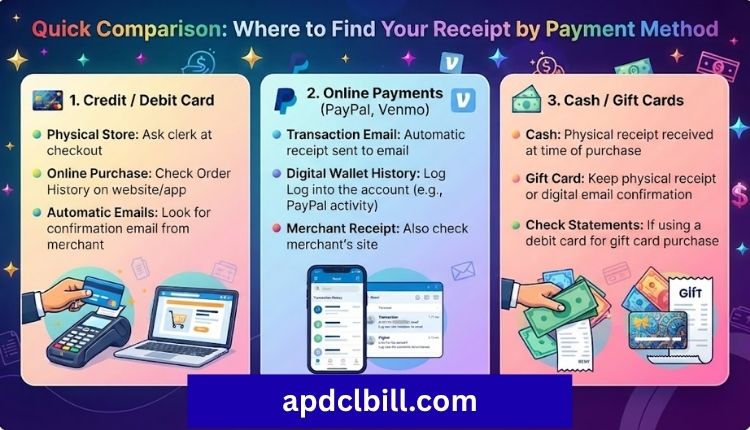
| Payment Method | Where the Receipt Lives |
| APDCL website / bill payment portal | Payment history section on the site |
| myBijulee app | In-app transaction log |
| UPI apps (GPay, PhonePe, Paytm) | App’s own transaction history |
| Net banking | Bank’s transaction statement |
| Collection centre (cash/cheque) | Physical receipt from the counter |
Common Mistakes to Avoid
- Not saving the receipt right after payment: It’s easy to close the confirmation screen without a second thought. Screenshot it before you do anything else.
- Mixing up the bill PDF with the payment receipt: These are two different documents that serve different purposes.
- Assuming a failed payment means the money is gone: In most cases, it’s auto-reversed by the bank within a few working days.
- Losing the transaction ID: Without it, customer support has a much harder time locating your payment.
Frequently Asked Questions
Is the APDCL bill payment receipt the same as the electricity bill?
No. The bill shows what you owe for a billing period; the receipt confirms that a specific payment against that bill went through successfully.
How long does it take for the receipt to generate after payment?
Usually within minutes for online payments. If it doesn’t show up within a few hours, check your bank statement to confirm the deduction went through before assuming there’s an issue.
Can I get a receipt for a payment I made months ago?
Yes, as long as the payment was made through a channel that stores transaction history, such as the APDCL bill download section, your bank, or a UPI app. Older records may take longer to retrieve depending on the platform’s retention policy.
What should I do if my receipt shows the wrong amount?
Compare it against your bank statement first. If the discrepancy is confirmed, contact APDCL customer care with your transaction reference number so they can investigate.
Do I need to submit my payment receipt anywhere after paying?
Not usually, since payments update automatically in APDCL’s system. Keep it for your own records rather than submitting it anywhere, unless a specific situation like a billing dispute requires it.
Can I download a receipt without registering on the APDCL portal?
Yes. Entering your consumer account number on the bill view page is enough for a one-time lookup; no account creation is required.
Conclusion
Saving your APDCL bill payment receipt takes about ten seconds right after you pay, but it can save you a lot of back-and-forth later if a payment ever goes missing or gets disputed. Whether you’re paying through the website, the myBijulee app, or a UPI service, make a habit of downloading or screenshotting the confirmation before you move on.
And if a receipt never shows up despite the money leaving your account, give it a day before assuming anything’s gone wrong; most delays resolve on their own once the bank and APDCL’s systems catch up with each other.
About the Author




