

apdcl online bill pay
APDCL Online Bill Pay: How to Pay Your Assam Electricity Bill in Minutes
Standing in a queue at a collection centre to pay an electricity bill is a chore most people in Assam are happy to skip. With APDCL online bill pay, you can settle your monthly dues from your phone in about five minutes, any time of day.
This guide covers what you need before you start, the exact steps, the payment methods you can use, and what to do when something goes wrong.
What Is APDCL Online Bill Pay?
APDCL stands for Assam Power Distribution Company Limited. It supplies electricity to homes, shops and industries across Assam. Online bill pay lets you clear your electricity charges through a website or app without visiting an office.
You don’t need to register an account for a one-time payment. You only need your consumer number and a working payment method.
What You Need Before You Start
Keep these ready so the process runs smoothly:
- Your 11-digit consumer account number, printed on any previous bill
- A phone or laptop with a stable internet connection
- A UPI app, debit or credit card, or net banking login
- Your registered mobile number, in case an OTP is required
If your number doesn’t work, check for extra spaces first. Some older accounts still carry the previous 12-digit format, so compare it against your latest bill.
Quick Overview: APDCL Online Bill Pay at a Glance
| Detail | Information |
| Who supplies power | Assam Power Distribution Company Limited (APDCL) |
| Account needed | Not required for one-time payment |
| Main requirement | 11-digit consumer number |
| Payment options | UPI, debit card, credit card, net banking, wallets |
| Mobile app | myBijulee (Android and iOS) |
| Time taken | Around 5 minutes |
| Proof of payment | Digital receipt after successful payment |
How to Pay Your APDCL Bill Online: Step by Step
Follow these steps for a simple no-login payment:
- Open the APDCL bill payment page.
- Enter your consumer account number and click Next.
- Confirm the bill amount and due date shown on the screen.
- Choose your payment method.
- Complete the verification through your bank or UPI app.
- Save or screenshot the receipt once the payment is confirmed.
Most payments show up right away. If yours doesn’t, wait until the next working day before you try again. Banks and the billing system sometimes take a short while to sync, and paying twice too early is the most common mistake.
For a shorter walkthrough of the same process, see our guide on how to pay your APDCL bill. If you like a more detailed explanation, our post on bill payment for APDCL covers the full Assam electricity bill process.
Check Your Bill Before Paying
It helps to see the exact amount first. Your bill lists the billing period, units used, meter readings and due date.
Use the APDCL bill check tool and enter your consumer number. You can also try the view bill option if you only want to look at the details without paying.
If the amount looks much higher than usual, the cause is often heavier appliance use in summer, a wrong meter reading, or extra charges. Compare it with your last two bills before paying.
APDCL Online Bill Payment Methods
| Method | Availability | What to know |
| UPI | Yes | Quickest option with instant confirmation |
| Debit card | Yes | Visa, Mastercard and RuPay are accepted |
| Credit card | Yes | A small convenience fee may apply |
| Net banking | Yes | Works with most major Indian banks |
| Mobile wallets | Yes | Paytm, Freecharge and similar apps |
| Cash or cheque | Yes | Only at authorised APDCL collection centres |
For most people, UPI is the easiest choice because it needs no card details and confirms quickly.
Using the myBijulee App
APDCL’s official app, myBijulee, is available for Android and iOS. It lets you view bills, pay online and recharge prepaid meters. It’s a good pick if you pay every month, since your details stay in one place.
Download it only from the Google Play Store or Apple App Store, and check that the publisher is APDCL.
How to Download Your Bill or Receipt
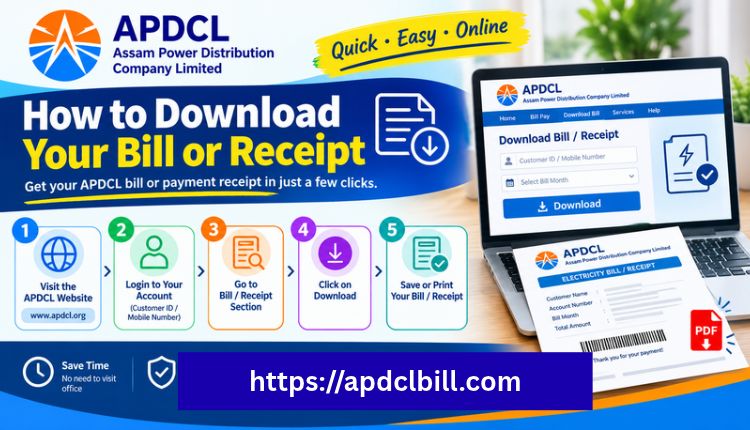
You may need a copy for a loan application, a rental agreement or proof of address. After you check your bill, choose the download or print option. Our guides on APDCL bill download and downloading the bill as a PDF show every step.
A good habit is to keep at least the last three months of bills and receipts saved on your phone. It makes any billing dispute much easier to sort out.
Prepaid Meter Recharge
If you have a smart prepaid meter, paying works more like a mobile recharge:
- Enter your consumer number or smart meter ID.
- Type in the amount you want to add.
- Pay by UPI, card or net banking.
- Wait for the balance to update, which usually takes a few minutes, and look for the SMS confirmation.
Common Problems and Quick Fixes
| Problem | Likely cause | What to do |
| Consumer number not accepted | Wrong format or extra space | Recheck the 11-digit number on your latest bill |
| Money deducted, bill still unpaid | Delay in bank or system sync | Wait one working day, then check again |
| Paid twice by mistake | Duplicate transaction | The extra amount is usually adjusted in the next bill |
| Bill amount looks too high | High usage or reading error | Compare with past bills and contact customer care |
| Payment page not loading | Network or browser issue | Clear the cache or try another browser |
If none of these solve it, contact APDCL customer care with your transaction reference number. You can also reach out to us for general questions about using this site.
Tips for Safe Online Payment
- Pay only through the official APDCL portal, the myBijulee app or trusted payment platforms.
- Never share your OTP, UPI PIN or card PIN with anyone.
- Check the amount and consumer name on screen before you confirm.
- Keep the receipt until your next bill arrives and shows the payment.
- Confirm tariff rates and policy details on APDCL’s official website, since they can change.
You can also read more about this website to see what it does and how the information is prepared.
Frequently Asked Questions
How do I do APDCL online bill pay without registering?
Open the payment page, enter your 11-digit consumer number, confirm the amount and pay with UPI, card or net banking. No account or login is needed for a single payment.
Where can I find my consumer number?
It is printed on any earlier APDCL bill, usually near the top. Your bill also shows your consumer category next to it.
Can I pay my APDCL bill after the due date?
Yes, but a late surcharge may apply. Paying before the due date on your invoice avoids extra charges.
What if the payment failed but money was deducted?
Wait until the next working day. Most cases resolve on their own once the bank and the billing system sync. If not, contact customer care with your transaction ID.
Is online payment for APDCL safe?
It is generally safe when you use the official portal, the myBijulee app or a trusted payment app with a protected gateway.
Can I download a receipt after paying?
Yes. Official portals and most payment apps let you download or print the receipt after a successful transaction.
Can I recharge a prepaid meter online?
Yes. Enter your consumer number or smart meter ID, add the recharge amount and pay online. The balance updates within a few minutes.
Which payment method is fastest?
UPI is usually the fastest because it confirms instantly and needs no card details.
Conclusion
APDCL online bill pay saves time, avoids queues and gives you a digital receipt for your records. Keep your 11-digit consumer number handy, check the bill amount first, pick UPI or another method that suits you, and save the receipt. If you run into trouble, most issues clear up within one working day.
Ready to pay? Start at the APDCL bill payment page, or view your latest dues first with the bill check tool. For a full overview of checking, paying and downloading, see our APDCL Assam bill guide.
About the Author



