
apdcl bill check balance
If you’re an APDCL consumer in Assam, checking your bill balance doesn’t require a trip to a payment counter or a phone call to customer care. You can pull up the exact amount you owe, or the balance left on your prepaid meter, from your phone in under a minute. This guide walks through both cases: postpaid consumers who want to see their outstanding bill, and prepaid consumers who want to check their remaining meter balance.
APDCL (Assam Power Distribution Company Limited) is the state-run electricity distributor serving homes and businesses across Assam. Whether you’re on a regular monthly bill or a smart prepaid meter, the balance check process is short, but a few small details, like which consumer number format to use, trip people up more often than the process itself.
Quick Overview
| Detail | Information |
| Applies to | Postpaid and prepaid APDCL consumers |
| What you need | 11-digit consumer account number or smart meter ID |
| Where to check | APDCL bill check page |
| Login required | No |
| Time needed | Under a minute |
| Balance types | Outstanding bill amount (postpaid), remaining balance (prepaid) |
How to Check Your APDCL Bill Balance Online
For postpaid consumers, “balance” means the amount currently due on your account, including any arrears from a previous cycle that haven’t cleared yet.
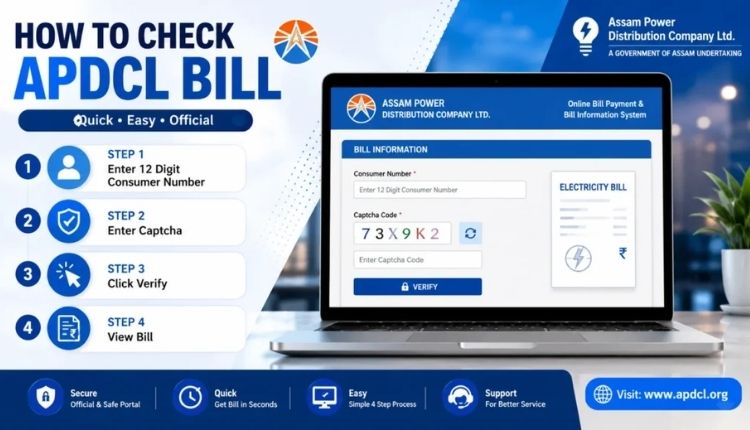
- Open the APDCL bill check tool on this site.
- Enter your 11-digit consumer account number. You’ll find this printed on any earlier bill.
- Submit the form. Your current balance, due date, and billing period will load on screen.
- If the amount looks off, compare it against your last paid receipt before assuming there’s an error.
That’s the whole process for a one-time check. No account creation, no OTP, no waiting on hold. If you’d rather see the process laid out with screenshots and more detail on reading the bill itself, the APDCL bill check online guide covers that in more depth.
Checking Balance on a Prepaid Meter
Prepaid works differently. Instead of an outstanding amount, you’re checking how much recharge balance is left before your power gets cut off.
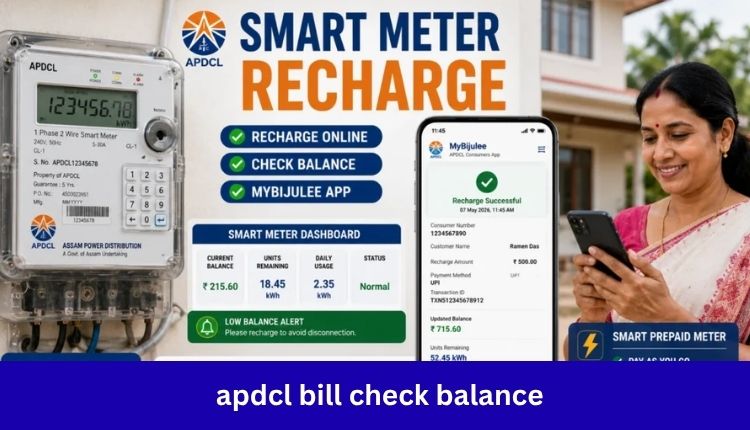
- Go to the prepaid recharge page.
- Enter your consumer number or smart meter ID.
- Your current balance and estimated days of power remaining will display.
- If the balance is running low, recharge directly from the same page.
Smart meters typically send a low-balance SMS alert once you drop below a set threshold, but it’s worth checking manually if you haven’t received one in a while, since SMS delivery isn’t always reliable.
Why Your Consumer Number Might Not Work
This is the most common snag people run into. A few things to check:
- Extra spaces or a trailing character copied along with the number from a PDF or SMS.
- Old 12-digit format vs. new 11-digit format: Older accounts sometimes still carry the legacy format if the system hasn’t fully updated it.
- Typos from handwritten bills, especially where a 0 and an O, or a 1 and a 7, look similar.
If none of that fixes it, the number itself may not have synced correctly in APDCL’s system, and that’s a case for customer care rather than something you can fix from your end.
Balance Check Methods Compared
| Method | Login Needed | Best For | Notes |
| APDCL bill check page | No | Quick one-time balance lookup | Fastest option, works for postpaid |
| myBijulee mobile app | Optional account | Regular users who check often | Also handles payments and history |
| SMS alerts | Automatic | Prepaid users | Sent when balance runs low |
| Customer care call | No | When the number won’t load online | Slower, useful for disputes |
What the Balance Screen Actually Shows You
Once your bill loads, you’re not just getting a single number. A typical result includes the billing period, previous and current meter readings, units consumed, any arrears carried over, and the final payable amount with its due date. If you want to keep a copy for a rental agreement, loan application, or your own records, you can download it as a PDF straight from the same screen, or check the bill download guide for the full walkthrough.
Once you’ve confirmed the balance, paying it takes just a few more steps through UPI, card, or net banking. The APDCL bill payment guide covers that part step by step, and if you need proof after paying, the view bill receipt page explains how to pull that up too.
When the Balance Shown Seems Wrong
A few reasons this happens, roughly in order of how often they come up:
- A payment hasn’t synced yet: Bank confirmation and APDCL’s billing system don’t always update at the same moment. Give it until the next working day before assuming something’s broken.
- Meter reading was estimated, not actual: This happens when a reading wasn’t taken on schedule, and it usually corrects itself the following cycle.
- Arrears from an old cycle are still attached to the account.
- Tariff category changed without the update reflecting yet, which affects how the units are priced.
For anything beyond a sync delay, it’s worth reaching out through APDCL’s customer care channel with your consumer number and the billing period in question ready to go.
Frequently Asked Questions
Do I need to register an account to check my APDCL bill balance?
No. A one-time balance check only needs your 11-digit consumer account number. No login or OTP is required.
Why does my prepaid meter balance show zero even after a recent recharge?
This is usually a short sync delay between the payment gateway and the meter system. It typically clears within a few minutes; if it doesn’t, check your recharge confirmation SMS to confirm the payment actually went through.
Can I check the balance for someone else’s connection?
Yes, as long as you have their consumer account number. The tool doesn’t verify identity beyond the number itself, so keep that number private if you’d rather others not view your bill.
What’s the difference between checking my bill and checking my balance?
For postpaid accounts, they’re the same thing: the amount currently due. For prepaid accounts, “checking your bill” doesn’t really apply since there’s no bill, only a running balance that drops as you consume power.
How often is the balance updated?
Postpaid balances update once a new bill is generated for the cycle. Prepaid balances update in near real time as you use electricity.
Is there a fee for checking my balance online?
No. Checking your balance, whether postpaid or prepaid, is free. Fees only apply in some cases when paying by credit card.
Conclusion
Checking your APDCL bill balance really comes down to having your consumer number ready and knowing which page to use, postpaid or prepaid. Most of the confusion people run into isn’t about the balance itself; it’s a mismatched number format or a payment that hasn’t synced yet. Bookmark the APDCL bill check page for postpaid balances or the prepaid recharge page if you’re on a smart meter, and you’ll have your answer well before you’d have gotten through to a customer care line.
About the Author




