
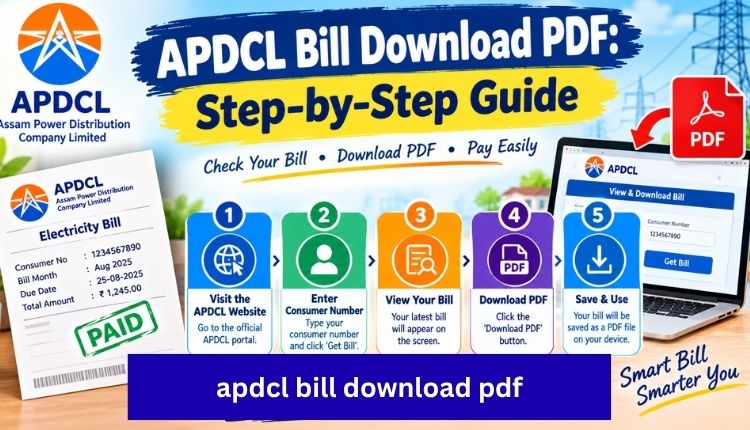
apdcl bill download pdf
Losing a paper bill is annoying, but it doesn’t actually cost you anything if you know where to pull a digital copy. APDCL keeps every consumer’s billing history online, and downloading a PDF version takes under two minutes once you have your consumer number handy. This guide walks through the exact steps, what the PDF actually contains, and what to do when the download doesn’t go smoothly.
Quick Overview
| Detail | Information |
| What you need | 11-digit consumer account number |
| File format | |
| Login required | No, for a one-time download |
| Time required | 1–2 minutes |
| Cost | Free |
| Where to download | APDCL bill check page |
Why You’d Want a PDF Copy
Most people only think about downloading a bill when they suddenly need one: a bank asking for address proof, a landlord wanting utility records, or a loan officer requesting the last three months of payments. A PDF is easier to email, print, or attach to a form than a screenshot, and it keeps the formatting (consumer details, meter readings, tariff breakdown) intact.
It’s also just good practice to keep your own archive. Bills disappear, printers run out of ink, and APDCL’s own portal occasionally resets or takes downtime for maintenance. Having your own folder of downloaded PDFs means you’re never stuck.
How to Download Your APDCL Bill PDF (Step by Step)
You don’t need to create an account or remember a password for this. Here’s the process:
- Go to the APDCL bill check tool.
- Enter your 11-digit consumer account number. You’ll find this printed on any earlier bill, usually near the top.
- Submit the form. Your current bill details, including units consumed and the amount due, will load on screen.
- Look for the download or print icon next to the bill summary.
- Click it, and the PDF will either open in a new tab or start downloading directly to your device.
- Save it somewhere you’ll actually remember, a dedicated “Bills” folder works better than your general Downloads folder six months from now.
If you’d rather see the bill on screen first before deciding whether to save it, the view bill page shows the same information without forcing an immediate download.
What’s Inside the PDF
The downloaded file isn’t just a total amount. A full APDCL bill PDF includes:
| Field | What It Shows |
| Consumer number | Your unique 11-digit account ID |
| Billing period | The month or cycle the bill covers |
| Meter readings | Previous and current readings |
| Units consumed | Total electricity used in kWh |
| Tariff category | Domestic, commercial, or HT rate applied |
| Amount due | Final payable amount |
| Due date | Last date before late charges apply |
| Payment history | Prior payment reference, if applicable |
If any of these numbers look off compared to what you remember using, it’s worth double-checking the meter reading against your own meter before assuming it’s an error. Genuine reading mistakes do happen, but so does forgetting how many appliances were running that month.
Other Ways to Access Your Bill
Downloading a PDF from the website isn’t the only route. Depending on what’s convenient for you:
- myBijulee app: APDCL’s official mobile app lets you check and download bills from your phone, alongside paying and recharging prepaid meters.
- APDCL online bill portal: Works the same way as the main download tool but is set up for people who want to check, pay, and download in one visit.
- SMS or email: Some consumers who’ve registered their mobile number or email with APDCL get bill notifications automatically, though the full PDF still needs to be pulled from the portal.
Troubleshooting: When the Download Doesn’t Work
| Problem | Likely Cause | Fix |
| Consumer number rejected | Extra spaces or wrong digit count | Recheck against a past physical bill; older accounts sometimes have a 12-digit legacy number instead of 11 |
| PDF won’t open | Browser blocking the download | Try a different browser, or check your device’s download folder directly |
| Bill shows as unavailable | Current cycle not yet generated | Wait a day or two after your usual billing date |
| Page times out | Server load or connectivity issue | Retry after a few minutes rather than refreshing repeatedly |
| Old bill missing | Portal typically stores only recent cycles | Contact APDCL customer care for archived records older than a few months |
If your consumer number keeps failing across multiple attempts, it’s worth confirming the exact digits with your local APDCL office rather than guessing at variations.
Downloading vs Paying: They’re Not the Same Step
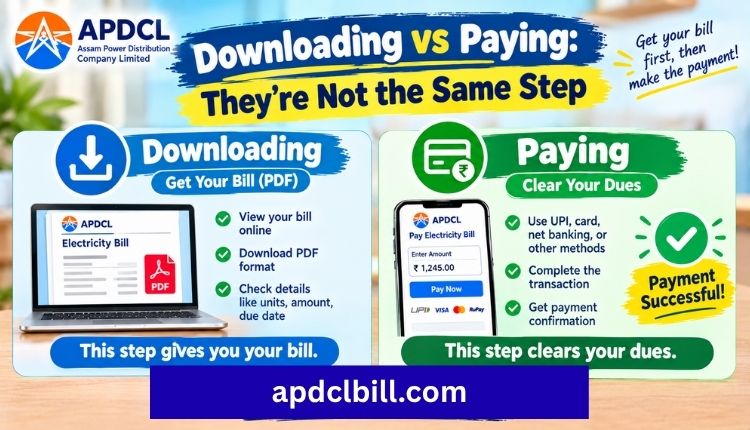
One thing that trips people up: downloading a bill and paying it are separate actions on the portal. You can download a PDF purely for your records without triggering any payment. If you do want to settle the amount at the same time, the APDCL bill payment page handles UPI, cards, net banking, and wallets, and you can grab the PDF receipt afterward as proof of payment.
Frequently Asked Questions
Do I need to register an account to download my APDCL bill PDF?
No. Entering your 11-digit consumer number on the bill check page is enough for a one-time download. No login or registration is required.
Is the downloaded PDF an official document?
Yes, it reflects the same billing data APDCL maintains in its system and is generally accepted as valid proof of billing or address, though for legal or financial submissions it’s worth checking with the specific institution about their requirements.
Can I download bills from previous months, not just the current one?
The portal usually holds recent billing cycles. For anything older, you’ll need to reach out to APDCL customer care with your consumer number.
Why does my PDF show a different amount than what I expected to pay?
This usually comes down to late fees, adjustments from a previous payment, or a change in tariff category. Check the breakdown printed in the PDF itself before assuming it’s an error.
Can I download the bill from my phone?
Yes. The bill check page works on mobile browsers, and the myBijulee app offers the same download function natively.
Is it safe to download my bill from a third-party site?
Stick to APDCL’s official channels or trusted portals that pull directly from APDCL’s system. Avoid sites asking for extra personal information beyond your consumer number to show a bill.
Conclusion
Getting your APDCL bill as a PDF really does come down to one number and a couple of clicks. Keep your consumer number saved somewhere handy (a notes app works fine), and downloading becomes a thirty-second task instead of something you have to hunt for every time. If you run into an error along the way, the troubleshooting table above covers most of what actually goes wrong in practice.
About the Author




