
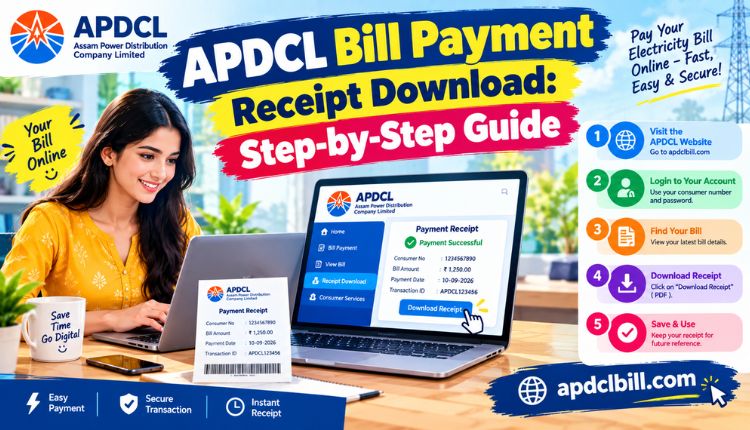
apdcl bill payment receipt download
You just paid your electricity bill, and now you need proof of it. Maybe it’s for your landlord, maybe it’s a reimbursement form at work, or maybe you just want to be sure the money actually reached APDCL. Whatever the reason, downloading your APDCL bill payment receipt takes only a couple of minutes once you know the right steps.
This guide covers exactly how to download your receipt after paying online, what to do if it doesn’t show up right away, and how to keep your records organized so you’re not hunting through old emails six months from now.
What Is an APDCL Bill Payment Receipt?
An APDCL bill payment receipt is the document generated once your electricity payment goes through successfully. It’s proof that the payment was made, not a statement of what you owe. The receipt typically lists your consumer number, the amount paid, the transaction date, a reference or transaction ID, and the payment method used.
People download this receipt for a handful of reasons: tax filing, rental proof, employer reimbursements, or simply double-checking that a payment didn’t silently fail. If you’ve ever paid a bill and then panicked because you couldn’t find confirmation anywhere, a saved receipt is the fix.
Quick Overview: APDCL Payment Receipt at a Glance
| Detail | Information |
| Generated after | A successful APDCL bill payment, online or offline |
| File format | Downloadable PDF, also viewable on screen and printable |
| Where to get it | Payment confirmation screen or the APDCL bill check page |
| Information included | Consumer number, amount paid, date, transaction ID, payment mode |
| Login required | No, for a one-time consumer number lookup |
| Validity | No expiry date; usable as permanent proof of payment |
How to Download Your APDCL Bill Payment Receipt
If you paid through UPI, a card, net banking, or a wallet, your receipt is tied to that specific transaction. Here’s the process:
- Go to the APDCL bill payment page and locate your recent transaction, or head to the bill check tool and enter your consumer number.
- Enter your 11-digit consumer account number exactly as printed on a past bill, no spaces or dashes added.
- Once the account loads, open the payment history or transaction section.
- Find the payment you’re after and select the receipt or “get PDF” option.
- Download the file and save it somewhere you’ll actually find again.
- Print it if you need a hard copy for a physical submission.
If the download button doesn’t do anything, try switching browsers first. It sounds too simple to work, but a surprising number of failed downloads trace back to a browser blocking pop-ups rather than any problem with your account.
Receipt Download Availability by Payment Method
Not every payment method generates a receipt the same way. Here’s the breakdown:
| Payment Method | Receipt Available | Where to Download |
| UPI | Yes, instantly | App transaction history and the bill portal |
| Debit Card | Yes, instantly | Email confirmation and the bill check page |
| Credit Card | Yes, instantly | Email confirmation and the portal |
| Net Banking | Yes, instantly | Bank statement plus the portal receipt |
| Mobile Wallets | Yes, instantly | Wallet app history and the portal record |
| Cash/Cheque at collection centre | Physical counterfoil, digital copy if logged | Counter receipt, or the portal if entered by staff |
If you paid in person at a collection centre, the paper slip you’re handed is your immediate proof. Most centres also log the payment digitally, so it’s worth checking the portal a day or two later to see if a downloadable version has appeared too.
What to Do If the Receipt Doesn’t Download
A few things commonly go wrong, and none of them mean your payment failed:
- Nothing loads after entering the consumer number: Check for a typo, an extra space, or a mismatch between the older 12-digit format and the current 11-digit one.
- Receipt is missing right after payment: There’s often a short delay between the payment gateway and APDCL’s own system. Give it a few hours before assuming something is wrong.
- PDF file won’t open: Try downloading again in a different browser, or check that your PDF viewer is up to date.
- Old transactions aren’t listed: Some platforms only keep a rolling window of recent payments. For anything older, contact APDCL customer care with the payment date and amount.
For step-by-step help with locating the bill itself before you get to the receipt, the bill view guide walks through the lookup process in more detail.
Downloading Receipts Through the myBijulee App
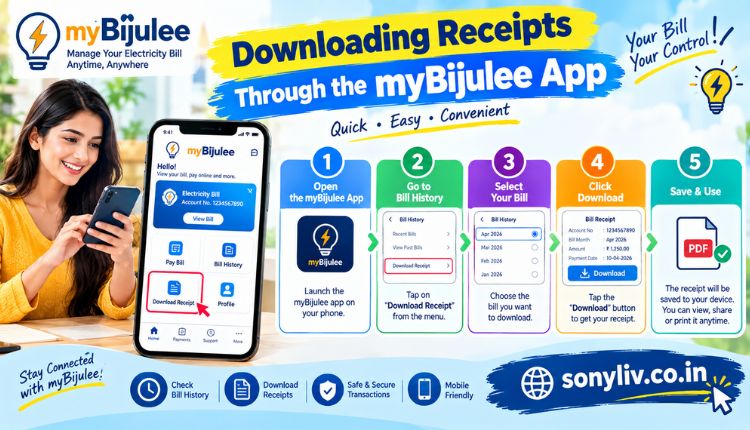
If you paid through the myBijulee app instead of a browser, your receipt sits in the payment history section of your account. Every transaction made through the app, whether UPI, card, or net banking, gets logged automatically, and you can download or share the PDF directly from your phone. This is often quicker than logging into a website, especially if you’re away from a computer and need proof on short notice. If you haven’t set the app up yet, the APDCL bill download page has the setup steps.
Bill Payment Receipt vs. Electricity Bill Copy
These two get confused constantly, so it’s worth clearing up. A bill copy shows what you owe for a billing cycle: units consumed, tariff category, due date. A payment receipt shows that a specific amount was actually paid.
If someone asks for “proof of payment,” they want the receipt, not the bill. If your consumer category or connection details need verifying, the bill copy handles that instead. You can pull a full bill copy separately through the bill payment online guide whenever you need one, Visit more.
Keeping Your Receipts Organized
It’s easy to close the tab the moment a payment clears and never think about it again, until someone actually asks for proof. A simple habit helps here: rename each PDF with the month and year right after downloading it, something like apdcl-receipt-sep-2026.pdf, and drop it into one dedicated folder. Keeping at least the last twelve months on hand covers most situations, from a landlord’s request to a reimbursement claim at work.
If you’re on a prepaid connection instead of a postpaid one, the receipt process looks a bit different since recharges work more like topping up a phone. The prepaid bill payment guide covers how recharge confirmations and receipts work for smart meters.
Frequently Asked Questions
Can I download my APDCL bill payment receipt without logging in?
Yes. A one-time lookup with your consumer number is enough. No account creation or registration is needed.
How soon after payment can I download the receipt?
Usually right away. If it doesn’t appear within a few hours, there may be a sync delay between the payment gateway and APDCL’s system.
What format is the APDCL payment receipt available in?
It’s downloadable as a PDF, and you can also view it on screen or print it directly from the browser.
Can I get a receipt for a payment made months ago?
Often, yes, though some platforms only keep a rolling window of transaction history. For older payments, contact APDCL customer care with the transaction date and amount.
Is there a fee for downloading a bill payment receipt?
No, downloading your receipt is free regardless of the payment method you used.
What if my downloaded receipt shows the wrong amount?
Contact APDCL customer care with your transaction reference number and the correct figure. Don’t assume it corrects itself automatically.
Do I need a receipt if my bill already shows as paid?
For everyday purposes, no. But for tenancy proof, tax filing, or workplace reimbursement, a receipt is usually the specific document requested.
Conclusion
Downloading your APDCL bill payment receipt isn’t complicated: enter your consumer number, open your payment history, and save the PDF while it’s fresh. The habit that actually saves you time later is doing this right after payment instead of digging for it weeks down the line when someone finally asks for proof.
Whether you paid through UPI, a card, net banking, or in person at a collection centre, a downloadable or printable record is available in almost every case. Save it, rename it, and you won’t be stuck searching for it the next time you need it.
About the Author




